
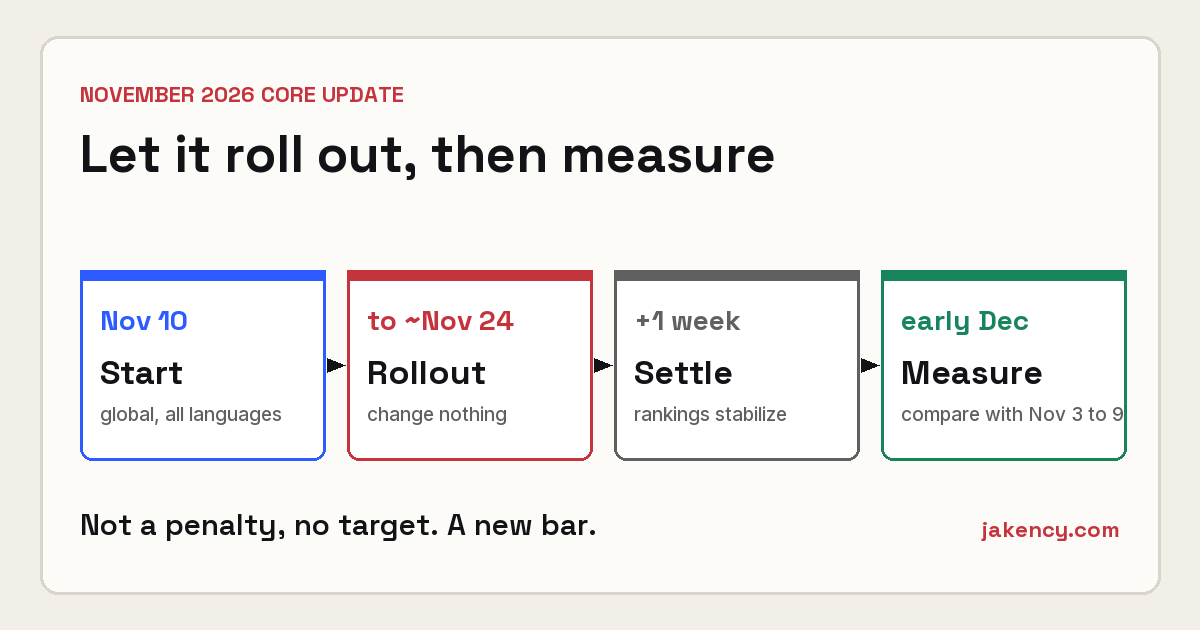
Google started rolling out its November 2026 core update on November 10. It applies worldwide and to every language, and the rollout may take up to two weeks. At Wevlopers we work with small and medium businesses every day, so we know how unsettling ranking movement can feel. The good news is that core updates are not penalties. They are broad reassessments of which pages best answer searchers. Wevlopers clients who focus on clear, useful content usually come through these periods stronger.
Right now the smartest move is patience plus a few concrete checks. This post from Wevlopers walks through exactly what to do (and what to leave alone) while the update continues.
What Google actually said
Google described the November 2026 release as a regular core update designed to better surface relevant, satisfying content from all types of sites. The official Search Status Dashboard notes that it began on 10 November and may take up to two weeks to complete. That window can stretch into the week of Thanksgiving and Black Friday for many markets.
Core updates do not target specific sites or industries. A drop in position does not automatically mean you broke a rule. Google’s own guidance is clear: wait until the rollout finishes, then wait at least one full additional week before comparing Search Console data.
What to do right now (the practical checklist)
1. Export a baseline. In Google Search Console, export clicks, impressions, average position and CTR for the week of 3–9 November (the clean week before the update started). Do this for your top pages and top queries. Save the file. You will need it later.
2. Annotate your reports. Add a note for 10 November in Search Console, Google Analytics and any rank tracker. Future you will thank present you.
3. Fix real technical problems immediately. Check the Page indexing report for sudden spikes in errors. Confirm important pages are not accidentally set to noindex. Verify your robots.txt is correct and that key pages return 200 status. These issues hurt you whether an update is running or not.
4. Keep your Google Business Profile accurate. For local businesses, confirm hours, phone, address and categories are current. Suggested edits now have a short window for owner response, so check notifications.
5. Continue normal publishing. If you had content planned, publish it. Do not pause everything. Just avoid mass rewrites or bulk deletions of pages that were performing well.
What not to do during the rollout
Avoid these common mistakes:
• Rewriting titles or content on pages that were ranking well last month.
• Deleting or merging pages based on a few days of volatile data.
• Buying links or running a full disavow in a panic.
• Changing site structure, URLs or templates until the data settles.
Google specifically warns against “quick fix” changes. Small position slips (for example, 2 to 4) usually need no action. Larger drops deserve a calm review against Google’s helpful content questions after the update ends.

AI Overviews, Gemini 4 Hydrogen and what it means for visibility
While the core update rolls out, Google also made Gemini 4 Hydrogen the default model in AI Mode and for complex queries in AI Overviews. AI Overviews now appear on a large majority of searches in many markets. Being cited inside those answers matters more than it did a year ago.
Practical steps that help both traditional rankings and AI citations:
• Lead sections with a clear, direct answer in the first 40–60 words.
• Include specific numbers, dates and named sources where they add value.
• Make sure your most important pages are crawlable and return clean HTML.
• Keep author, date and contact information transparent.
These habits improve the chance that both Google’s ranking systems and its AI features find your content useful.
How and when to measure the real impact
Once Google marks the update complete on the Search Status Dashboard (likely around late November), wait one more full week. Then compare that week with your 3–9 November baseline. Look at:
• Overall clicks and impressions
• Top pages that gained or lost visibility
• Query-level movement
• Separate reports for Web, Images, Video if those matter to you
For retailers, remember that Black Friday and Cyber Monday traffic will not be a clean comparison week. Local service businesses should also watch Google Business Profile insights for calls and direction requests.
The bottom line for small businesses
Core updates reward sites that consistently help real customers. If your pages answer questions clearly, show real experience and stay technically sound, you are already doing the right things. Use the next two weeks to lock in a baseline, fix obvious errors and keep serving your customers. The dramatic changes can wait until the numbers settle.
Need a clear view of how your site and Google Business Profile are positioned before and after this update? Wevlopers offers practical audits focused on real results for small and medium businesses. Reach out if you want a straightforward review.


