
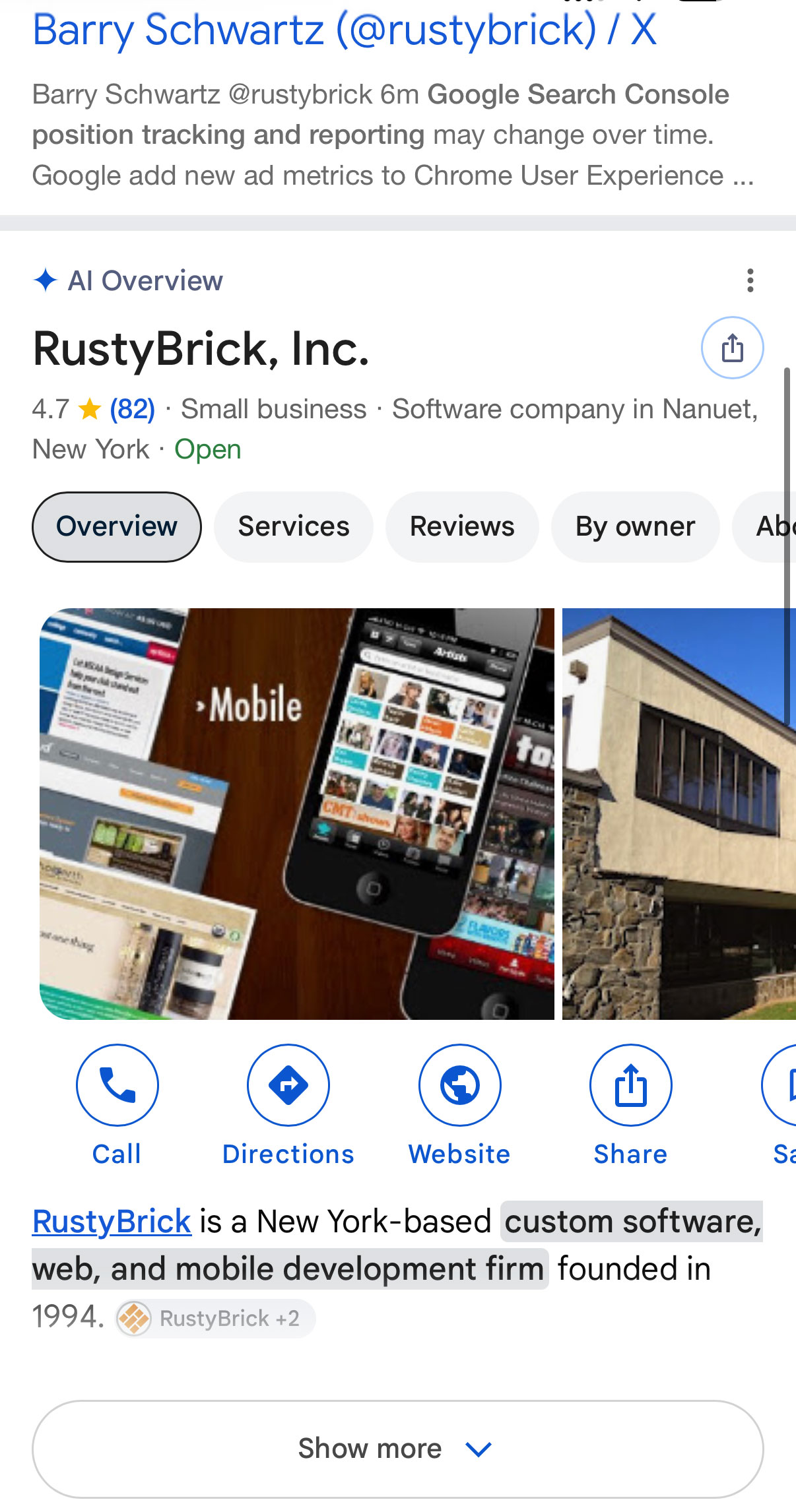
Google just changed how it shows information about brands in search results. For many brand-name searches on desktop, the AI Overview has moved into the right-hand column. That is the same space where the Knowledge Panel used to appear. At Wevlopers, we see this as a practical shift that every small and medium business needs to understand, especially if you rely on branded search for leads. Wevlopers works with clients across India, Australia, the UK, USA and UAE, and this change affects all of them.
The brand website now usually sits at the top of the main results again. The AI-generated summary sits on the side. That can be better for clicks to your site. But the AI text is written by Google’s systems using sources it chooses. You do not fully control it the way you could with a claimed Knowledge Panel. At Wevlopers we have already started checking client brands and adjusting the sources that feed these panels.
What Exactly Changed
SEO professionals first noticed the layout shift around 31 October and 2 November 2026. Search Engine Roundtable reported it on 2 November. Examples include searches for Apple, Zillow, Coca-Cola and even Google itself. In the new layout the main column starts with the official website and sitelinks. The right column shows a panel labeled AI Overview that mixes generated text with fact rows.
This is not an official Google announcement. It appears on desktop results in the US for many brands. Mobile and other countries may still look different. Rank trackers and Search Console do not separate these side panels cleanly, so the numbers you see can look noisy.
One clear risk is inconsistency. In one reported Zillow example the generated text said the company was founded in 2006 while a fact row below said 2004. Both years have some basis, but the panel shows both without explanation. That is the trade-off: more AI text, less brand control.
Why This Matters for Small and Medium Businesses
When someone searches your business name they are usually ready to take action. They want your website, phone number, reviews or directions. An AI Overview in the side panel can still shape that first impression. Studies from Ahrefs and others show AI Overviews appear on a large majority of branded searches. Third-party sources such as Wikipedia, YouTube, LinkedIn and review sites are often cited more than the brand’s own pages.
If the summary is accurate and positive, it reinforces trust. If it pulls old complaints, outdated pricing or competitor mentions, it creates friction before the person ever reaches your site. Google’s own guidance says traditional SEO still applies to AI features. Pages must be indexed and eligible for snippets. There is no special llms.txt or chunking requirement. Original, people-first content with clear facts works better than recycled text.
How to Influence What the AI Says About You
You cannot edit the AI Overview directly. You can improve the sources it is likely to use. Focus on consistency and freshness across the places Google trusts.
Check your brand search today. Search your exact business name on desktop, logged out if possible. Note what the side panel says, which sources it cites, and whether your site is at the top of the main results. Do the same for your name plus “reviews” or “price”.
Strengthen your About and service pages. Write clear, factual sentences that state what you do, who you serve, where you operate and how long you have been doing it. Use first-hand details. Google has told sites to fact-check any AI-generated content before publishing, including titles, meta descriptions and alt text. Apply the same standard to your own pages.
Keep Google Business Profile complete. Hours, categories, services, photos and replies to reviews all feed local and AI results. Google has said generative features pull directly from Business Profiles for local recommendations. For restaurants, you can now control third-party ordering links. Use that if it applies.
Align other profiles. LinkedIn company page, YouTube channel, directory listings and review platforms should match your website on name, services and location. Inconsistent facts give the AI conflicting material.
Monitor and respond to reviews. Recent positive reviews and thoughtful owner replies help. Negative patterns that are left unaddressed can surface in summaries.
Practical Checklist for This Week
Use this short list with your team or agency:
1. Search your brand name on desktop and mobile. Screenshot the results.
2. List every source cited in any AI Overview.
3. Update your website About page with clear, accurate facts in plain text.
4. Confirm your Google Business Profile is verified, complete and has recent photos.
5. Check that LinkedIn, directories and review sites match the website.
6. Reply to recent reviews.
7. In Search Console, look at the Generative AI performance report if it is available for your property. Note which pages appear in AI features.
8. Schedule a monthly brand-search check. The layout can still change.
These steps take a few hours and give you more control over the information Google’s AI uses. They also strengthen your regular organic and local rankings because the same foundations apply.
What to Watch Next
Google continues to test more inline links in AI Overviews and AI Mode, official-source sections for some tasks, and expanded Preferred Sources. Search Console Generative AI reports are fully available. AI Overviews now appear on a high percentage of searches overall. For local businesses the Business Profile remains a core signal.
The side-column move for brand searches is still new and not confirmed as permanent. Treat it as the current reality and plan accordingly. The businesses that keep their facts consistent, their content original and their profiles complete will be better positioned whether the panel stays on the side or moves again.
If you want a second pair of eyes on your brand search results and the sources feeding them, Wevlopers offers a free initial review. We look at your website, Google Business Profile and the AI summaries that appear for your name, then give clear next steps. Reach out through the contact page on wevlopers.com or reply to this post.


