
Most small businesses hear “block AI bots” and either ignore it or block everything. Both moves cost you. At Wevlopers we see this every week when we audit sites for clients who want more AI search visibility. The wrong line in robots.txt can quietly remove you from ChatGPT answers while leaving Google rankings untouched. Wevlopers clients in India, the UAE, Australia and the UK keep asking the same question: how do we stay visible in AI answers without feeding every training model?
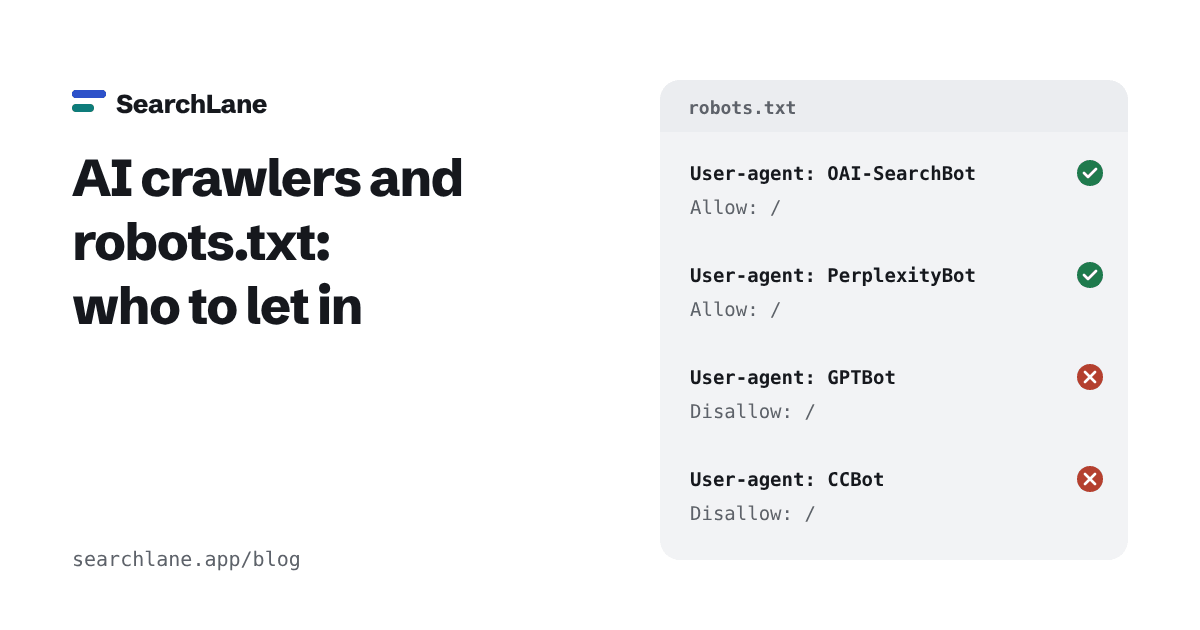
Training bots, search bots and user-fetch bots are different
OpenAI, Anthropic and Perplexity run separate crawlers for separate jobs. Blocking the wrong one is the most common mistake we fix at Wevlopers.
Training crawlers collect pages to train future models. Examples: GPTBot (OpenAI), ClaudeBot (Anthropic), CCBot, Google-Extended (a control token for Gemini training and grounding). Blocking these does not remove you from live AI search answers.
Search / index crawlers build the indexes that ChatGPT, Claude and Perplexity use to cite sources. Examples: OAI-SearchBot, Claude-SearchBot, PerplexityBot. OpenAI’s own docs say sites that opt out of OAI-SearchBot “will not be shown in ChatGPT search answers” (except as plain navigational links).
User-triggered fetchers open a specific page because a real person asked the assistant about it. Examples: ChatGPT-User, Claude-User, Perplexity-User. These often ignore or only partially follow robots.txt because a user started the request.
Googlebot still handles Google Search, AI Overviews and AI Mode. Never block it if you want Google traffic.
Recommended robots.txt for most small and medium businesses
Here is the practical setup we use for the majority of Wevlopers clients who want AI visibility but prefer not to feed training models:
# Allow AI search and user-fetch bots
User-agent: OAI-SearchBot
User-agent: ChatGPT-User
User-agent: Claude-SearchBot
User-agent: Claude-User
User-agent: PerplexityBot
User-agent: Perplexity-User
Allow: /
# Optional: block training
User-agent: GPTBot
User-agent: ClaudeBot
User-agent: Google-Extended
User-agent: Applebot-Extended
User-agent: CCBot
Disallow: /
# Everyone else, including Googlebot and Bingbot
User-agent: *
Allow: /
Sitemap: https://yourdomain.com/sitemap.xml
Copy your existing Disallow rules (admin, cart, search, etc.) into every named group if you have them. A crawler that finds a group with its own name ignores the * group completely.
Quick checklist before you change anything
1. Open yourdomain.com/robots.txt and search for GPTBot, OAI-SearchBot, ClaudeBot, Claude-SearchBot and PerplexityBot.
2. Check your CDN or firewall (Cloudflare often blocks AI training bots by default on newer sites). A 403 at the edge overrides robots.txt.
3. Decide your policy: maximum visibility (allow all), or visibility without training (block only the training group).
4. Test after 24 hours. Ask ChatGPT or Claude a question your page should answer and see if it cites you.
5. Keep Googlebot unrestricted. AI Overviews and AI Mode still rely on normal Google indexing.
Recent studies show many large sites already split the two: they block GPTBot while still allowing OAI-SearchBot. Smaller businesses can do the same in five minutes.
What this actually changes for your business
If your site is currently blocking OAI-SearchBot or Claude-SearchBot by accident, fixing it can put you back into AI answers without touching your Google rankings. If you are fine with training use, simply leave those lines out. Either way, the goal is the same: be the clear, useful source that AI systems can cite when someone asks a question your business answers every day.
Need help checking your current robots.txt and AI crawl access? Wevlopers offers a free quick audit for small and medium businesses. Just reply or reach out and we’ll look at the file together.


