
Google has started contacting businesses with automated calls, texts and WhatsApp messages to confirm details for your Google Business Profile. The new Collected Info tab shows you exactly what Google collected and lets you delete inaccurate entries before they affect customers.
At Wevlopers we see this as one of the most practical controls Google has given local businesses in 2026. Wrong hours, missing services or outdated attributes quietly cost calls and direction requests. Wevlopers works with home service, healthcare and local businesses across India, Australia, the UK, USA and UAE, and the same pattern keeps appearing: automated updates look helpful until they are wrong.
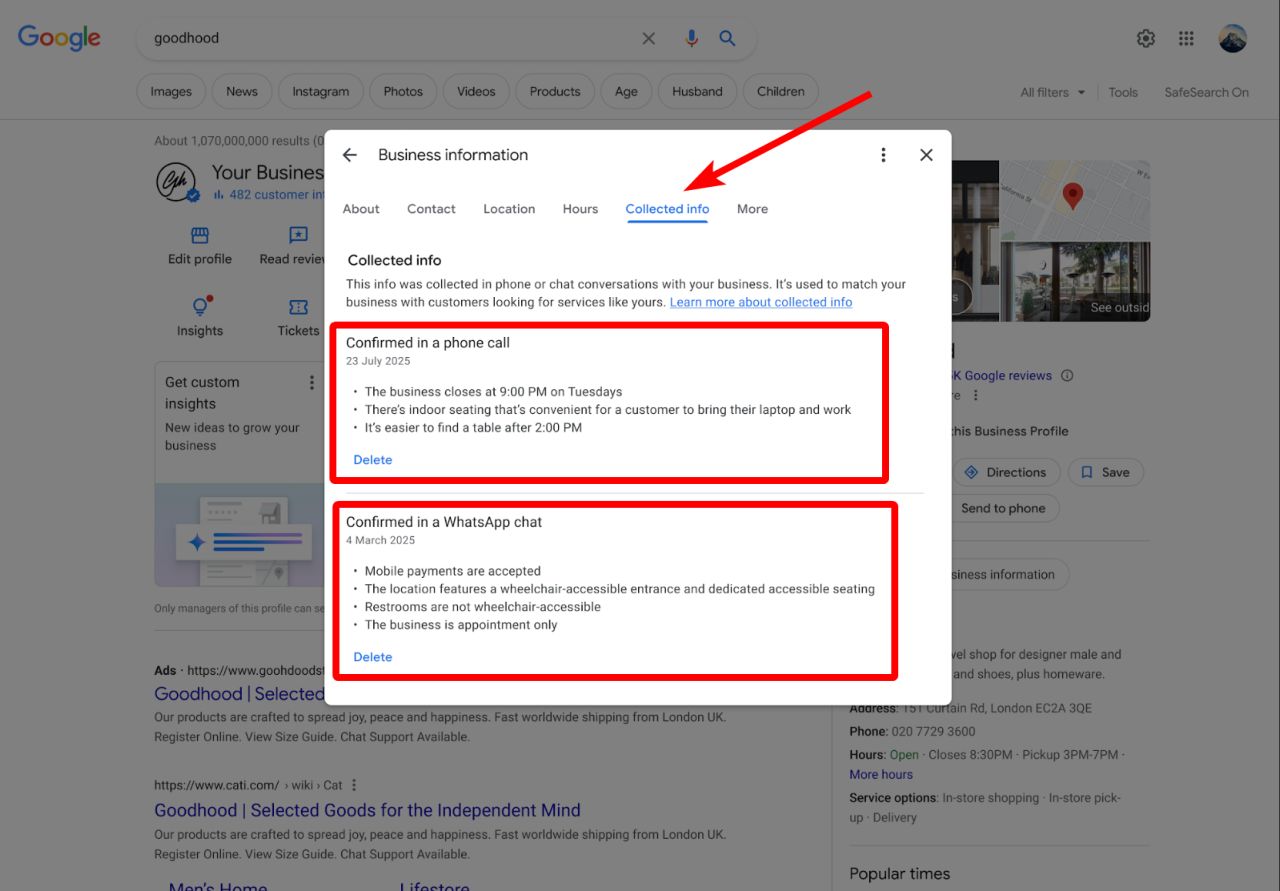
What the Collected Info Tab Actually Does
The tab lives under Edit profile in your Google Business Profile dashboard. It lists information Google’s automated assistant has gathered, along with the source (call, text, WhatsApp or web) and the collection date. You can delete individual items.
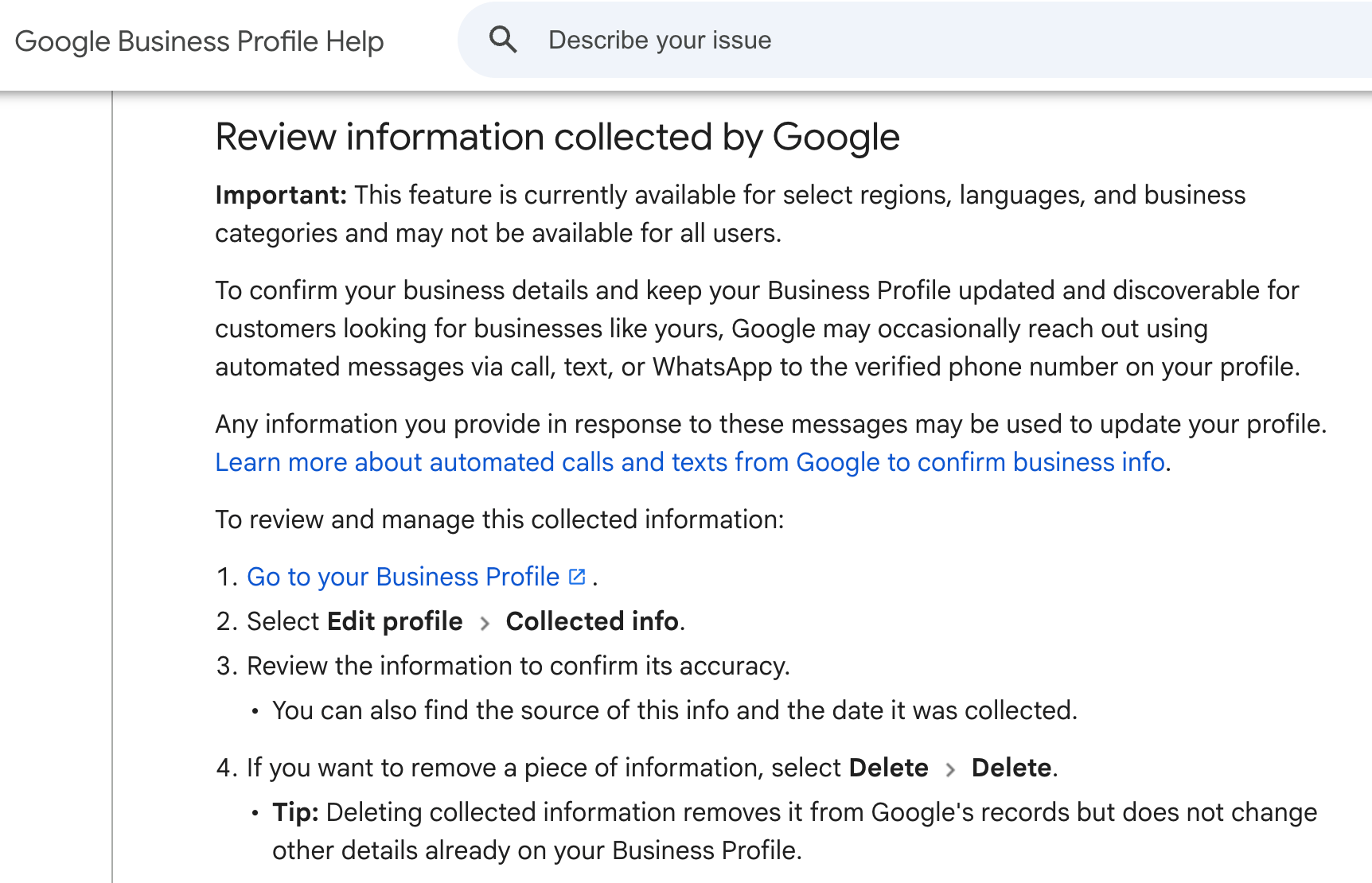
Google’s own help documentation says the feature is available for select regions, languages and business categories. It is rolling out gradually, so not every profile has it yet. When it is present, the description reads that the information was collected in phone or chat conversations and is used to match your business with customers looking for services like yours.
Important limitation: deleting an entry removes it from Google’s collected records. It does not automatically reverse changes already published on the live profile. You still need to edit the public fields separately if they are wrong.
How to Find and Review the Tab
Follow these steps:
1. Sign in to the Google account that owns the Business Profile.
2. Go to your profile and select Edit profile.
3. Look for the Collected info section or tab.
4. Review each entry. Note the source and date.
5. Delete anything inaccurate or outdated.
After you finish, open your public listing on Google Search and Maps. Check hours, services, attributes, description and contact details. Correct anything that does not match reality.
Why Accuracy Matters More Now
Local ranking still rests on relevance, distance and prominence. Accurate, complete profiles strengthen relevance. Google’s AI Overviews and AI Mode also pull business details from your profile, reviews and website. Outdated collected information can surface in AI answers when someone searches for your brand or a service in your area.
Recent ranking volatility on 20–21 October 2026 reminds us that Google continues to test and refine results. Stable, correct data helps your profile stay consistent through those shifts. At Wevlopers we recommend treating the Collected Info tab as part of a monthly profile audit, not a one-time check.
Practical Checklist for Business Owners
Use this short list every month:
Confirm ownership and verification status.
Open Edit profile and check for the Collected info section.
Delete any incorrect entries and note the source so you can fix the root cause.
Compare the live listing against your actual hours, services and attributes.
Train front-desk staff and answering services on what to say if Google calls.
For multi-location brands, assign one person per location or use a management tool to review all profiles.
Add fresh photos and a short post so the profile shows recent activity.
Service-area businesses should pay extra attention to service descriptions and areas covered. Storefront businesses should verify hours and accessibility attributes carefully.
Watch This Explanation
This recent video walks through what the automated outreach means and how the tab works:
What to Do If You Do Not See the Tab Yet
Do not worry. The feature is still rolling out. Keep your profile complete and accurate in the meantime. Monitor suggested edits (you now have four days to reject many of them) and reply to reviews promptly. These habits protect you whether or not the Collected Info tab has appeared.
If Google contacts your verified number, answer consistently with current details. Inaccurate replies during those interactions become the source of future collected entries.
Keep Your Profile Working for You
The Collected Info tab is a useful control, but it only helps if you use it. Wrong information on Google Business Profile still drives customers to competitors or causes them to call the wrong number. A fifteen-minute monthly review prevents most of those problems.
If you want a second pair of eyes on your profile, hours, categories and services, Wevlopers offers a free local SEO audit focused on Google Business Profile and Maps visibility. Reach out and we will show you the highest-impact fixes for your market.


