
Google just fixed one of the biggest frustrations restaurant owners have had with their Business Profiles. For years, third-party ordering links from DoorDash, Uber Eats, Grubhub and similar platforms appeared automatically. Removing them meant contacting each provider and waiting (often up to five business days). As of late October 2026, restaurants can now turn specific providers on or off directly inside the Google Business Profile dashboard. Wevlopers has seen this pattern repeatedly with local clients: when the profile does not match how the business actually operates, calls and orders suffer. This update puts control back with the owner.
The change was announced by Google’s Lisa Landsman. It is live across countries. You can manage whether a provider shows for pickup, delivery, or both, and you can still set a preferred option. Wevlopers recommends checking this the same day you see the option, because outdated or high-commission links sit in a high-visibility spot on Search and Maps.
How the New Ordering Controls Work
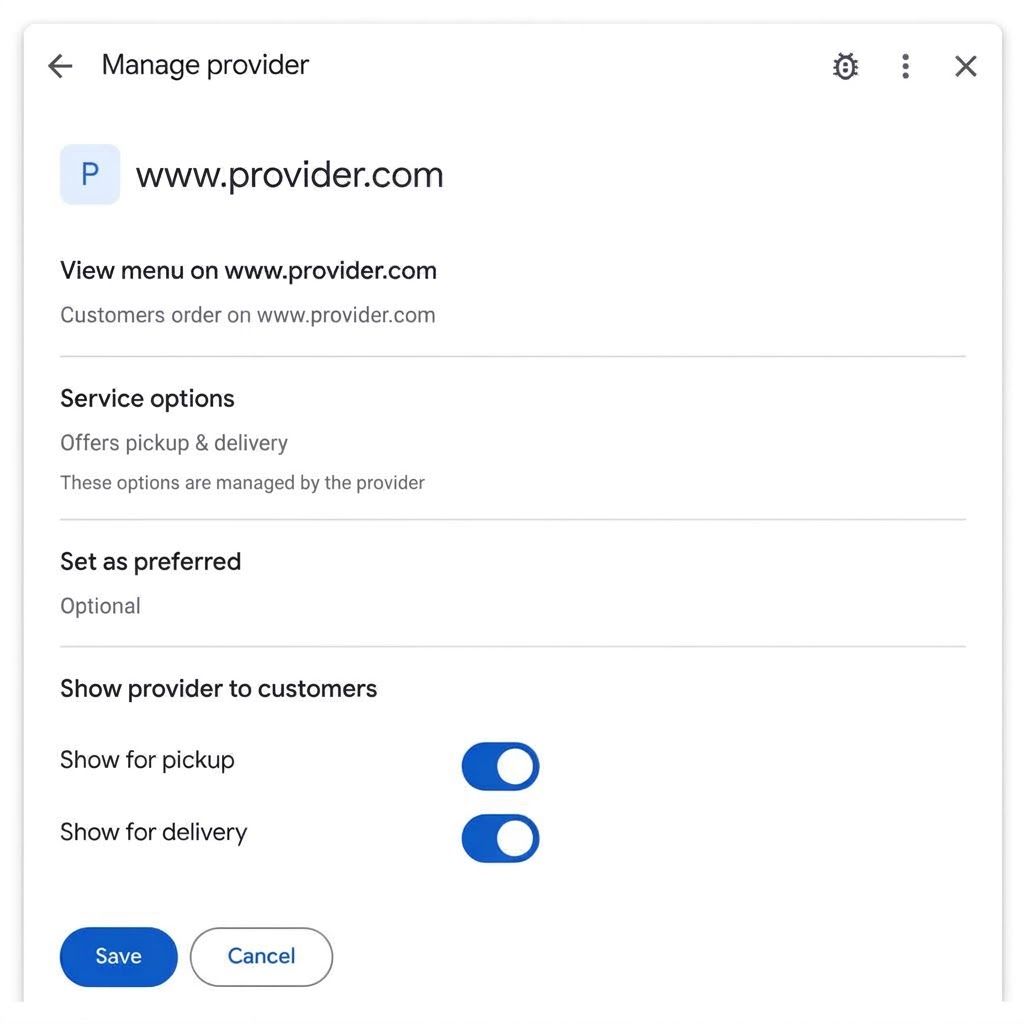
Open your Google Business Profile, go to the Food ordering section, and select a provider. You will see toggles under “Show provider to customers” for pickup and delivery. Turning them off hides that option without needing the provider to process a removal request. You can still mark one as preferred so it appears with a clear label. Google’s documentation notes that turning off “Accept orders on your profile” entirely will hide all third-party options (including any custom links you added), so use the individual toggles instead.
Practical steps for restaurant owners:
- Log in and review every listed provider this week.
- Disable any platform you no longer work with or that hurts your margins.
- Add your own direct ordering link if you have one and set it as preferred for both pickup and delivery where it applies.
- Check the public profile on mobile after saving to confirm the change is live.
This does not only matter for restaurants. Any local business with third-party booking, scheduling or ordering integrations should treat the profile as a live control panel rather than a set-and-forget listing. Outdated links confuse customers and can dilute the path to your own higher-margin channels.
Other Recent Google Business Profile Activity Worth Watching
Around the same time, Google began emailing some businesses that it was automatically adding Facebook Messenger m.me links. An m.me link opens a direct chat with your Facebook Page. For many SMBs this is useful because customers already use Messenger, but you should verify the link is correct and that your team actually monitors the inbox. Unanswered messages create a poor experience that can show up in reviews.
Google is also testing Google Business Home, a closed beta (currently limited to selected categories in the US and UK) that brings Business Profile, Merchant Center, YouTube and Ads into one place. It is not widely available yet, so most businesses should continue managing profiles the normal way while watching for an invite. Separately, AI Overviews now appear on a large majority of searches and Google has increased the number and prominence of links inside AI answers. Complete, accurate profiles with clear services, recent photos and steady reviews give both traditional local results and AI systems better signals.
A Short Checklist for Every Local Business This Week
Whether you run a restaurant, home service, clinic or professional practice, these actions protect and improve local visibility:
- Review ordering, booking and messaging links. Remove or correct anything that no longer matches how you take business.
- Confirm primary category and services. The primary category remains one of the strongest local ranking factors. Secondary categories should only cover what you actually offer.
- Add or refresh photos and a short video. Profiles with recent, clear photos of the premises, team and work performed convert better and give AI systems more to work with.
- Check hours, phone and website. Make sure they are consistent with your site and that the website link goes to a real page (not a social profile or shortener).
- Respond to recent reviews. Recency matters more than pure volume for many local packs. A steady stream of genuine reviews plus owner replies strengthens prominence.
- Post one useful update. Keep contact details out of the post body itself; use the built-in buttons so Google can verify them.
These steps take less than an hour for most single-location businesses and directly affect the calls, direction requests and website visits that show up in your profile performance data.
Why This Matters Beyond the New Toggle
Local search still drives a large share of high-intent customers for small and medium businesses. At the same time, AI Overviews and AI Mode pull facts from profiles, reviews and websites. A profile that lists outdated ordering partners, has thin services or lacks recent photos is weaker in both places. The new restaurant controls are a clear example of Google giving owners more direct levers. The same principle applies everywhere: treat the Business Profile as an active channel, not a static directory entry.
Wevlopers works with local businesses across India, Australia, the UK, USA and UAE to keep profiles accurate, complete and aligned with real operations. If your listing has grown messy over the years or you are not sure which links and categories are helping versus hurting, a focused review usually surfaces quick wins.
Want a free look at your Google Business Profile and the highest-impact fixes? Reply to this post or contact Wevlopers for a practical audit focused on calls and bookings rather than vanity metrics.


